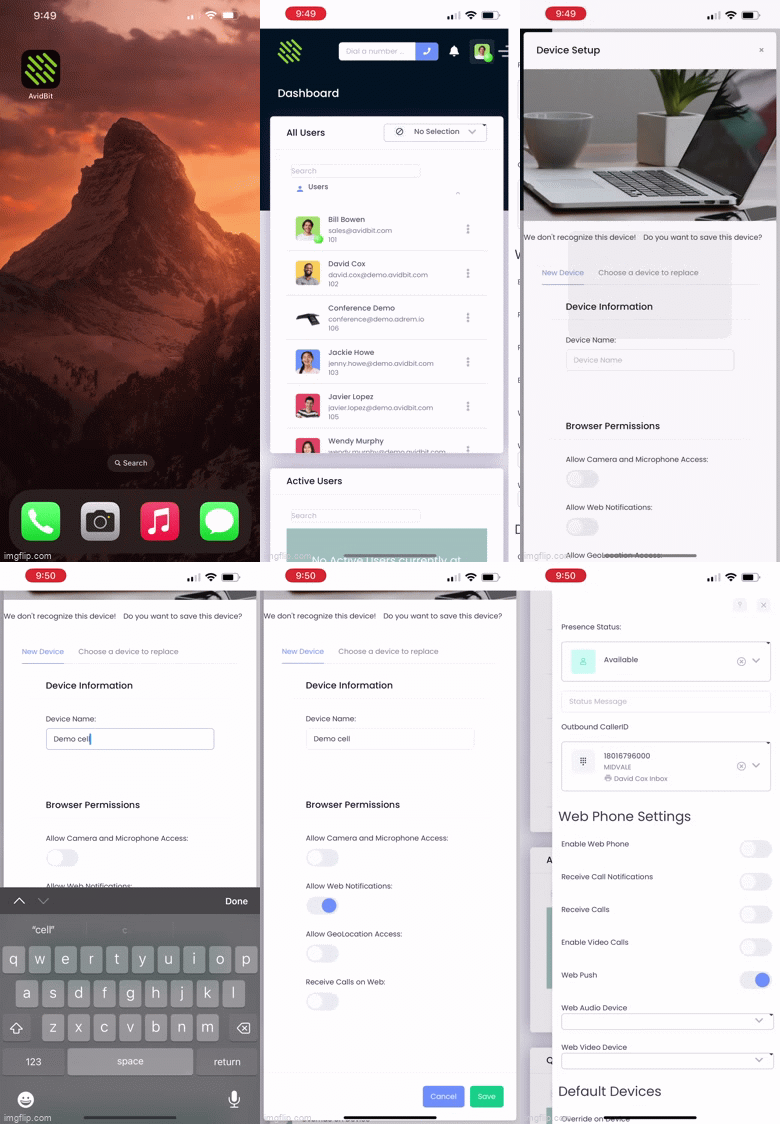
Push notifications allow notifications to come through the phone even if the AvidBit app is closed. This ensures that you will not be missing any important notifications.
Installing iOS 16.4
- Navigate to Settings on your iPhone
- Press General
- Press Software Update
- Press Download and Install to install 16.4
AvidBit App Settings
- Navigate to the AvidBit App on your phone
- In the upper right corner select your initials
- Under “Web Phone Settings” toggle ON Web Push
- Press Allow on “AvidBit would like to send you notifications”
- In the Device Setup screen, set the Device Name as Your Name + Cell (e.g. John Cell)
- Toggle ON Allow Web Notifications
- You are now able to receive push notifications. To verify, exit out of the app, enter back in, click on your initials again and ensure that “Web Push” is toggled ON